Learn how to integrate an AI agent with my CRM system. This practical guide covers architecture, API connections, and automated workflows for real results.
Jan 11, 2026
At its core, integrating an AI agent with your CRM system is all about making the two systems talk to each other. You connect them using APIs, figure out which data fields need to map across, and then build workflows to automate the right tasks. Done right, this turns your CRM from a simple database into an intelligent partner that handles grunt work and surfaces key insights automatically. Think of it as a system that can finally manage lead scoring, summarize calls, and handle data entry all on its own.
Why Integrating an AI Agent with Your CRM Is a Game Changer
Let's cut through the buzzwords and get straight to what this means for your business. Picture your operations manager drowning in manual data entry or your head of sales trying to figure out which leads to chase first from a massive list. These aren't just small frustrations; they're real bottlenecks that kill productivity and hurt your bottom line. This is exactly where pairing AI with your CRM proves its worth.
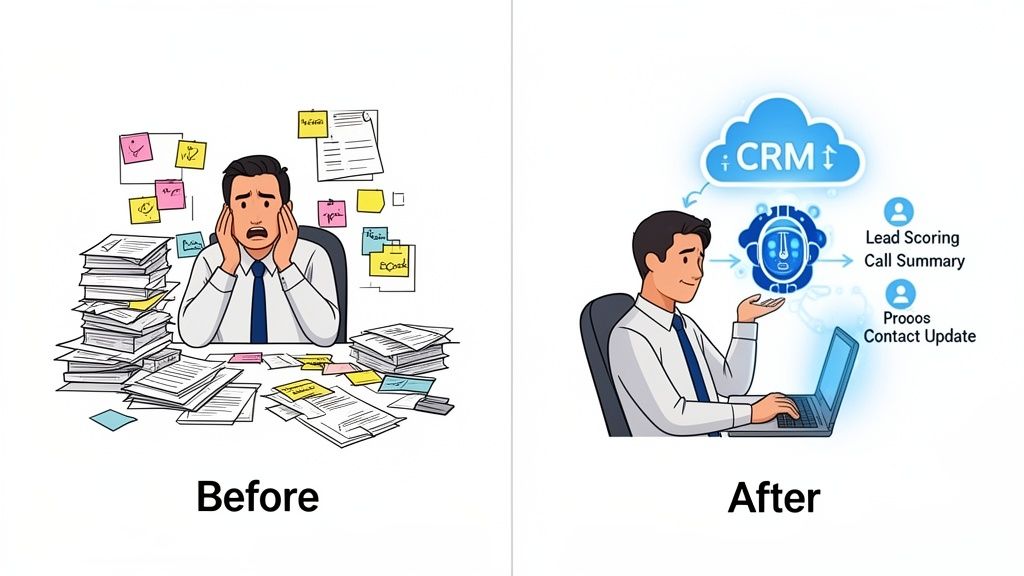
This isn’t just another IT project. It’s a strategic decision to give your team back their most valuable resource: time. When you automate the repetitive stuff, you free up your people to do what they do best—building relationships with customers and closing deals.
The Real-World Impact on Operations
An AI agent plugged into your CRM can immediately change how your team works day-to-day. Here are a few real-world examples I've seen in action:
Automated Call Summaries: A salesperson finishes a call, and the AI agent automatically transcribes it, creates a concise summary, and logs it right into the contact's record in the CRM. No more manual note-taking.
Intelligent Lead Scoring: Instead of manually sifting through new inquiries, the agent instantly analyzes where the lead came from, their company details, and past interactions to assign a priority score. Your team knows exactly who to call first.
Proactive Task Creation: The AI spots a phrase like "I'll send the proposal tomorrow" in an email exchange and automatically creates a reminder task in the CRM for the right person. Nothing falls through the cracks.
This kind of automation isn't just about moving faster. It’s also about improving data quality and cutting down on the simple human errors that inevitably happen with manual entry. This is particularly powerful for smaller operations, and you can learn more about how https://shalev.agency/blog/ai-automation-for-small-business can help leaner teams punch above their weight.
Driving Revenue and Retention
The numbers speak for themselves. The financial upside is huge. Companies that integrate AI into their CRM systems report an average ROI of 139% in just over a year. Better yet, they often see a customer churn reduction of around 30%, which directly helps stabilize revenue.
To put these advantages in perspective, here's a quick breakdown of where you'll see the biggest wins.
Key Benefits of AI Agent and CRM Integration
Benefit Area | Impact on Business Operations | Example |
|---|---|---|
Productivity | Frees up team members from repetitive, low-value tasks like data entry and manual follow-ups. | AI automatically logs call notes and summaries, saving a sales rep 1-2 hours per day. |
Sales Velocity | Speeds up the sales cycle by instantly prioritizing high-potential leads and automating communication. | An AI agent qualifies an inbound lead and schedules a demo within minutes of the initial form submission. |
Customer Insight | Analyzes communication patterns and CRM data to uncover hidden opportunities and risks. | The agent flags an account with decreasing email engagement as "at-risk" before the customer churns. |
Data Accuracy | Reduces human error by automating data input and ensuring all records are consistent and up-to-date. | All new contacts from a webinar are automatically created in the CRM with complete and accurate information. |
This table illustrates how the integration moves beyond simple convenience to deliver measurable improvements across the board.
By turning your CRM into a proactive system, you move from reactive problem-solving to anticipating customer needs. The AI can flag at-risk accounts based on communication patterns, allowing your team to intervene before a client is lost.
Ultimately, this integration builds a smarter, more agile business. If you're looking for a roadmap on how to get started, this guide on how to implement AI in business effectively offers some great strategic steps. Before we get into the nuts and bolts, grasping why you're doing this is the most important step in making sure your technical work delivers real business results.
Choosing Your Integration Architecture and Tools
Before you even think about code, you need a blueprint. How you decide to connect your AI agent and CRM will dictate everything that comes next—your budget, timeline, scalability, and how much of a headache it will be to maintain down the road.
Getting this right is the most critical first step. There's no single "best" way to do it; the right choice boils down to your team's technical chops, how quickly you need to get this running, and what you’re ultimately trying to achieve.
Let’s dig into the three main paths you can take.
Direct API Integration: The Custom Approach
This is the hands-on, built-from-scratch method. Your developers will write custom code that makes your AI agent's API talk directly to your CRM's API. Going this route gives you maximum control and flexibility, letting you build highly specific workflows tailored perfectly to your business processes.
This is the path to take when you have unique needs that off-the-shelf tools just can't handle. Maybe you need to perform complex data transformations on the fly or implement a multi-step conditional logic that simpler platforms don't support.
Of course, all that power comes at a price. It requires a dedicated development team, a longer timeline, and a real commitment to ongoing maintenance for bug fixes and API updates. This is the go-to for established companies with in-house engineers who need a truly bespoke solution.
Middleware Platforms: The Fast and Flexible Route
Think of middleware as the universal translator between your AI and CRM. These platforms, often called iPaaS (Integration Platform as a Service), act as a bridge. Tools like Zapier or Make provide a visual, click-and-drag interface to build automated workflows with little to no code.
This is often the best place to start, especially for startups and small to mid-sized businesses. You can spin up a working prototype in a few hours, not weeks, which is perfect for testing an idea without a huge upfront investment.
For instance, say you want to automatically summarize new customer emails and pop that summary into a note in your CRM. With middleware, you’d simply connect a "New Email" trigger to an AI action, then map the output to the "Create Note" action in your CRM. You give up some of the deep customization you get with a direct API build, but the speed and simplicity are a massive win. For businesses needing a hand, specialized AI automation agency services can help get these integrations off the ground quickly.
Making the Connection: APIs and Data Mapping
Once you've got your architectural blueprint, it's time to roll up your sleeves and get into the nitty-gritty of the integration. This is where we create a secure handshake between your AI agent and your CRM, and then teach them how to speak the same language. This process boils down to two critical parts: locking down the connection with proper authentication and then meticulously mapping the data fields.
Think of an API as a dedicated, secure channel between your systems. Your AI needs to send a request—like "create a new contact" or "update this deal"—and the CRM needs to be able to trust that the request is legitimate before it acts. We need to give our AI the right credentials to use this channel.
Securing the Handshake with Authentication
Before a single byte of data can move, you have to establish a secure, trusted link. Leaving this connection open is like leaving your office front door unlocked overnight. The two most common ways to handle this are with API keys or a more robust protocol called OAuth 2.0.
API Keys (The Simple Keycard): An API key is just a long, unique string of characters that acts like a password for your AI. Your CRM generates it, and you plug it into your agent's configuration. When the agent makes a request, it presents this key, and the CRM checks it against its list. It's simple, effective, and perfect for server-to-server jobs where your AI is working behind the scenes.
OAuth 2.0 (The Delegated Access Pass): OAuth 2.0 is a bit more involved, but it's far more secure and flexible, especially when your application needs to act on behalf of a user. Instead of one static key, OAuth uses a flow where a user grants your app permission to access their data for a limited time. The app gets a temporary token to make API calls. This is the gold standard for any app where your users will connect their own Salesforce or HubSpot accounts.
So, which one should you choose? It's pretty straightforward. If your AI is a trusted internal system making calls on its own, an API key usually gets the job done. If you're building an app that other people will use to connect to their CRM accounts, OAuth 2.0 is non-negotiable.
The Unskippable Task of Data Mapping
With a secure connection in place, the next hurdle is making sure your systems actually understand each other. This is all about data mapping. Your AI might spit out a perfectly structured JSON object with fields like summary, sentiment, and actionItems. That’s great, but your CRM is only listening for its own language—it wants to hear about Contacts, Deals, or Tickets with fields like notes, lead_status, or next_step.
Data mapping is simply the act of creating a translation dictionary between these two systems. You have to tell the integration exactly which piece of AI data goes into which CRM field.
Honestly, this is where most integrations go wrong. A single mismatched field can silently break a workflow, flood your CRM with duplicate records, or even overwrite mission-critical information. Taking the time to map everything out deliberately is absolutely essential.
Figuring Out What to Map
First things first, you need to identify the core "objects" in your CRM that the AI will be touching. These are just the fundamental record types that hold all your business data.
Most integrations deal with a handful of common objects:
Contacts/Leads: The people you’re talking to.
Accounts/Companies: The organizations those people work for.
Deals/Opportunities: The potential sales you're tracking.
Tickets/Cases: Customer support issues that need resolving.
Notes/Activities: Records of calls, emails, meetings, and other interactions.
Once you know which objects you’re targeting, you can drill down into the specific fields. I always recommend creating a simple spreadsheet to visualize the connections before you even think about writing code.
Pro Tip: Don't try to boil the ocean. Start with the absolute minimum set of fields required to create or update a record. You can always come back and add more complexity later. Mapping dozens of fields on your first pass is a surefire way to get frustrated and create bugs that are a nightmare to track down.
Data Mapping in the Real World
Let's look at how this plays out in a couple of common scenarios.
Scenario 1: Logging an AI-Generated Meeting Summary
Your AI agent just transcribed and summarized a sales call. You need that summary logged as a note on the right contact's record in your CRM.
AI Agent Output (JSON):
{
"attendeeEmail": "jane.doe@example.com",
"meetingSummary": "Jane is interested in the enterprise plan but needs clarification on data security. Follow-up task is to send the security whitepaper.",
"sentiment": "positive"
}Mapping Logic:
Take the
attendeeEmailand use it to find the matching Contact in the CRM.Create a brand new Note object.
Map the
meetingSummaryfrom the AI to thebodyfield of that new Note.Finally, associate the new Note with the Contact record you found in step one.
Scenario 2: Updating a Lead's Status from an Email
Here, your AI agent scans an inbound email from a new prospect to figure out their intent.
AI Agent Output (JSON):
{
"leadEmail": "john.smith@example.com",
"intent": "demo_request",
"priority": "high"
}Mapping Logic:
Find the Lead in the CRM whose email matches
leadEmail.Look at the
intentfield. Since it’s ademo_request, update theLead Statusfield in the CRM to "Demo Requested."Take the
priorityvalue and map it to a custom CRM field you've created calledAI Priority, setting it to "High."
As you can see, mapping isn't just a simple copy-and-paste job. It's often a mix of data transformation and business logic—you have to look up records, apply rules, and sometimes even reformat the data. This is the real heart of a smart, useful integration.
Building Automated Workflows with Triggers and Webhooks
Connecting your AI and CRM is the first step, but the real magic happens when you make that connection dynamic. You need your systems to react to events as they happen, creating a setup that doesn't just hold data but actively works for you. This is where we move past simple data syncing and into the world of intelligent automation using triggers and webhooks.
A static integration is like getting a newspaper delivered once a day—useful, but you're always a bit behind. A dynamic one, powered by webhooks, is like getting breaking news alerts pushed to your phone the second something happens. That real-time awareness is what unlocks the true power of your AI-CRM integration.
The Role of Triggers and Webhooks
At the heart of it all, triggers and webhooks are pretty straightforward.
A trigger is simply an event that happens in one system—think a new lead getting created in your CRM or a contact's status changing. When that trigger fires, the system sends out a webhook, which is just a lightweight, automated message sent to a specific URL. It’s a notification telling your other system, "Hey, this just happened!"
Think of it like a security camera detecting motion. The motion itself is the trigger. The alert sent to your phone is the webhook. You then decide how to react. In our case, the CRM trigger sends a webhook to your AI agent, kicking off a specific task.
This entire communication process relies on a solid API connection, which handles the essential steps of authentication, data mapping, and synchronization.
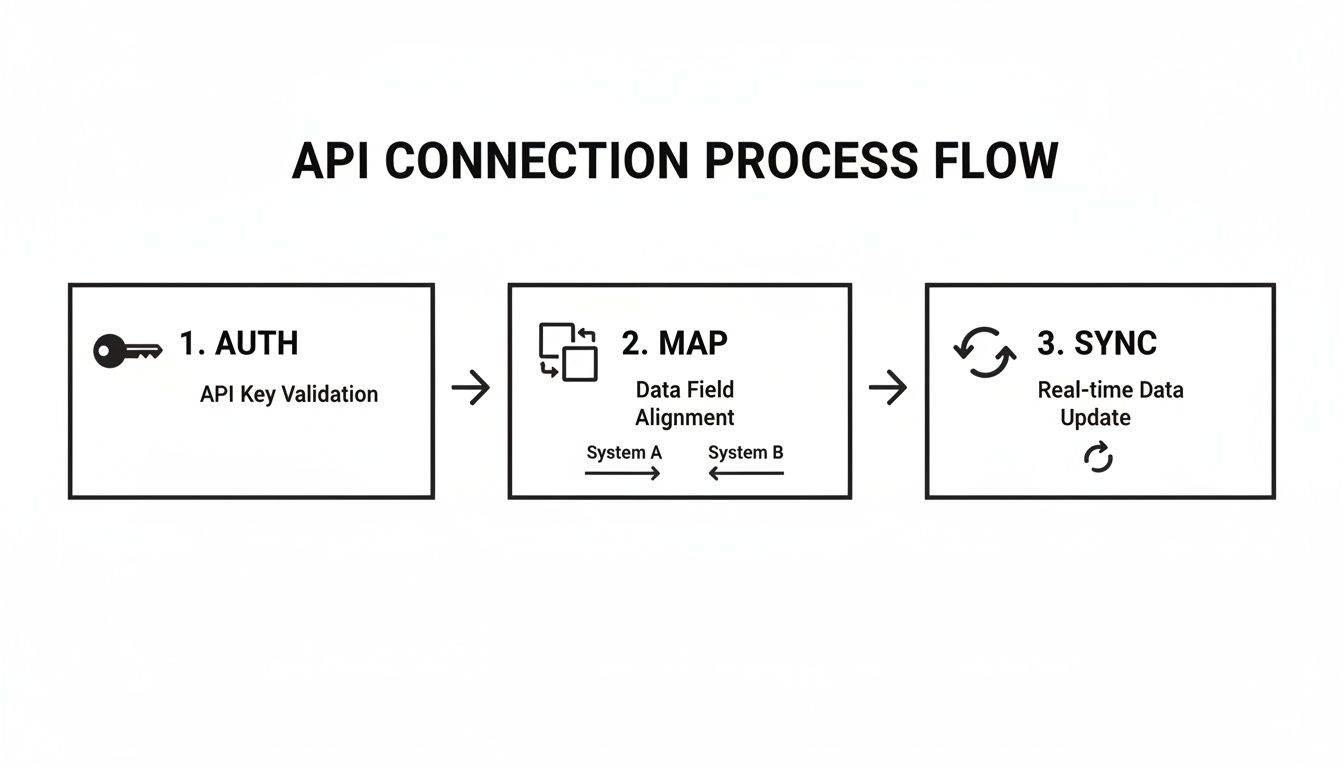
With that foundation in place, your triggers and webhooks can communicate securely and reliably.
A Real-World Example: Creating Urgent Tasks Automatically
Let's walk through a common, high-impact scenario. Say your AI agent is monitoring your support inbox. When an email comes in with an angry tone and words like "cancel" or "unhappy," you need to act—fast.
Here’s how the workflow plays out:
The Event: Your AI scans a new email and its sentiment analysis flags it as urgent.
The Action: The AI immediately sends a webhook payload to a specific API endpoint in your CRM.
The CRM Trigger: Your CRM receives the webhook and automatically creates a new, high-priority "Task" or "Case."
The Assignment: The task is instantly assigned to a senior support manager or a dedicated retention specialist.
The Notification: That manager gets an immediate alert, allowing them to jump on the problem before the customer is lost for good.
This whole sequence takes seconds, with zero human input needed. You’ve just flipped your support model from reactive to proactive, directly tackling a major business risk. To get a better handle on the underlying principles, our guide on what is workflow automation is a great resource.
Common AI-Powered CRM Workflow Patterns
The urgent task example is just one of many possibilities. Different triggers can kick off a variety of AI actions, each aimed at a specific business goal.
Here’s a table outlining a few common patterns I've seen deliver great results.
Workflow Trigger | AI Agent Action | Business Outcome | Example Platforms |
|---|---|---|---|
New Lead Created | Enrich lead data with company size, industry, and social profiles. | Sales reps have richer context for their first outreach, improving personalization and conversion rates. | Salesforce, HubSpot |
Support Ticket Submitted | Analyze ticket text for sentiment and urgency, then tag and route it. | High-priority issues are escalated automatically, reducing response times and improving customer satisfaction. | Zendesk, Freshdesk |
Deal Stage Changed to "Closed-Won" | Generate and send a personalized welcome email or kickoff packet. | New customers get a smooth, consistent onboarding experience, reducing manual work for account managers. | Pipedrive, Zoho CRM |
Contact Becomes Inactive | Identify contacts who haven't engaged in 90 days and suggest a re-engagement campaign. | Proactively prevents customer churn and helps clean up the contact database. | ActiveCampaign, Keap |
These patterns are fantastic starting points. They address common pain points—manual data entry, slow response times, and inconsistent follow-up—and show a clear return on investment.
Another Powerful Scenario: Automated Lead Enrichment
Let's dive deeper into another fantastic use case: enriching new leads the moment they hit your CRM. Having your sales team manually research every single prospect is a huge time-drain. An AI-powered workflow can handle this entirely in the background.
This time, the trigger starts in the CRM.
CRM Trigger: A new "Contact" is created, maybe from a "Contact Us" form on your website.
Webhook Action: The CRM immediately sends a webhook with the new contact's basic info (name, company, email) to your AI agent.
AI Agent Task: The AI gets to work. It might find the person on LinkedIn, look up the company's size and industry from a data provider, or even find recent news about their organization.
Data Push: Once its research is done, the AI makes an API call back to the CRM and updates the contact record, filling in custom fields like "Employee Count," "Industry," and "Key Talking Points."
By the time a salesperson even sees that new lead, it’s already packed with valuable context. This enables a much smarter, more personalized first conversation and dramatically increases the odds of success.
Building these automations is the final, most important step in figuring out how to integrate an AI agent with my CRM system. It’s what transforms two separate platforms into a single, intelligent machine that actively saves you time, prevents mistakes, and drives better business outcomes. Start with a couple of simple, high-value workflows like these to prove the concept and build momentum for more advanced automations down the road.
Managing Security, Privacy, and Ongoing Monitoring
Getting your AI agent and CRM to talk to each other is a huge milestone, but the work doesn't stop there. In many ways, the real work is just beginning. Now you have to make sure that connection stays secure, private, and reliable over the long haul.
Every time you connect two systems, you open up a new potential vulnerability. Being proactive about security isn’t just a nice-to-have; it’s absolutely essential for protecting your customer data and, frankly, your company's reputation.
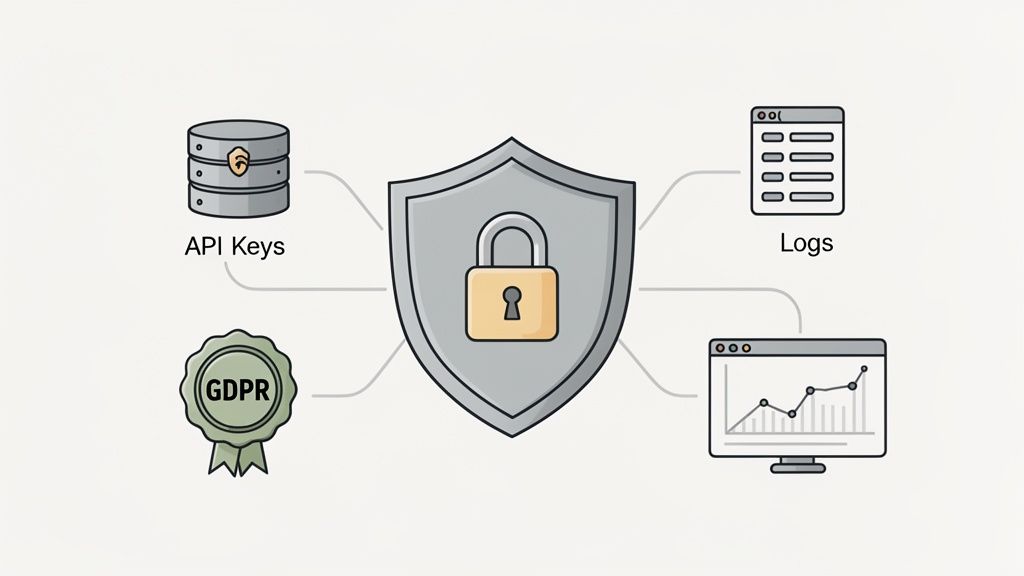
This operational side is where many integrations eventually stumble. A setup that works perfectly on day one can easily become a liability without the right monitoring and governance. Let's dig into how to build an integration that's robust, secure, and easy to maintain.
Fortifying Your Integration Security
First things first: you have to manage your credentials responsibly. I’ve seen it too many times—API keys hardcoded directly into scripts. It’s a recipe for disaster. A far better, and frankly non-negotiable, approach is to use a dedicated secrets manager.
Tools like AWS Secrets Manager, Google Secret Manager, or HashiCorp Vault were built for this. They keep your API keys and other secrets locked down in an encrypted vault, only granting access to authorized applications. This simple step keeps your keys out of your codebase, which dramatically cuts down the risk of a leak.
Beyond just protecting your keys, you need to live by the principle of data minimization. Your AI agent should only ever access the absolute minimum data required to do its job.
Limit API Scopes: When you generate API keys or set up OAuth, be stingy with permissions. If the agent just needs to read contacts and create notes, don't give it the power to delete deals. It's that simple.
Filter Data Payloads: Before you ship data from your CRM over to the AI, make sure to strip out any personally identifiable information (PII) or other sensitive fields that aren't necessary for the task at hand.
Security research is constantly uncovering new ways AI agents can be exploited. For example, some attacks use "indirect prompt injection" to trick an AI into leaking sensitive data by hiding malicious instructions inside what looks like a normal CRM record. This is a perfect example of why giving the AI less data to work with is always the safer bet.
Staying Compliant with Privacy Regulations
When you integrate an AI agent with your CRM system, you’re on the hook for how that third-party AI handles your customer data. This has huge implications for privacy laws like GDPR and CCPA.
Compliance really boils down to transparency. You have to know what data is being sent, where it's stored, and for how long. Only work with AI providers who offer a crystal-clear Data Processing Addendum (DPA) and give you real control over data retention policies. It's your job to make sure your AI partner upholds the same privacy standards you do.
Setting Up Robust Monitoring and Logging
You can't fix what you can't see. Once your integration goes live, you absolutely need a clear window into its performance and health. That's where monitoring and logging come in.
Your integration code should log every important event, no exceptions. This includes:
Every single successful API call between the two systems.
Any failed API calls, complete with the error code and message.
The start and end times of major workflow executions.
These logs are your first line of defense when something goes wrong. When a user reports that a contact didn't sync, your logs should be the first place you look to trace the exact sequence of events and find the point of failure.
But logging is reactive. You also need proactive alerts. You shouldn't have to wait for a user to tell you something's broken. Set up automated alerts that ping your team the moment a critical error pops up.
Common Alerts to Configure:
High API Error Rate: Fire an alert if more than 5% of API calls fail within a 15-minute window. This usually points to a bigger problem.
Authentication Failures: Send an immediate notification if you get an authentication error. This could mean an API key has expired or, worse, been compromised.
Webhook Timeouts: Get an alert if a webhook endpoint isn't responding in time, which could signal a service outage.
This kind of proactive setup turns frantic firefighting into routine maintenance and ensures your integration stays reliable as you grow. It's this combination of solid security, privacy-awareness, and vigilant monitoring that makes an integration truly ready for production.
Common Questions About AI and CRM Integration
Any time you start a new technical project, you're bound to have questions. When it comes to figuring out how to integrate an AI agent with my CRM system, I see the same practical concerns pop up again and again. Let's clear up some of that confusion with straightforward answers.
What Are the Best CRMs for AI Integration?
These days, most modern, cloud-based CRMs are built for this kind of thing. They come with solid APIs that make connecting an AI agent totally doable. Platforms like Salesforce, HubSpot, Zoho CRM, and Pipedrive are a few of the usual suspects, and for good reason.
If you are looking for a solution that can be more easily adjusted to your needs, or if you are already using other tools, you can consider creating a CRM on platforms such as Notion, Airtable, ClickUp, and Monday. Each of these platforms offers features that allow you to build and manage a CRM system that fits your specific requirements.
Do I Actually Need a Developer for This?
That really depends on how ambitious you're feeling. For simple, one-way data pushes, you can often get the job done without touching a single line of code.
No-Code/Low-Code Tools: Platforms like Zapier or Make are your best friends here. They have pre-built connectors that take care of the messy stuff like authentication and API calls. A simple workflow like, "when a new lead pops up in HubSpot, shoot the details over to an AI for analysis," is a perfect job for these tools.
Custom Development: On the other hand, if you're dreaming up more complex logic, need data to sync back and forth, or you're plugging in a custom-built AI model, you'll almost certainly need a developer. Writing custom code gives you total control and flexibility that you just can't get from an off-the-shelf solution.
Here's a good rule of thumb I always recommend: start with a no-code tool to quickly prove your concept. If it works but you hit a limitation, then it's time to bring in a developer to build a more robust, custom solution.
What's the Typical Cost to Build This?
The price tag for an AI-to-CRM integration is all over the map, depending entirely on how you build it. You’re basically looking at two different cost models.
First, there's the subscription model. If you use a middleware platform, you'll have a recurring monthly fee. This can be anything from $20 to several hundred dollars a month, based on how many tasks you're running. The benefit here is that it’s predictable and grows with your usage.
The other route is a one-time project cost. Hiring a freelancer or an agency to build a custom integration means a bigger investment upfront—think anywhere from a few thousand to tens of thousands of dollars, depending on how complex the project is. While it costs more to get started, your ongoing maintenance fees are usually much lower, though it's smart to budget for the occasional update or bug fix.
At Shalev Agency, we live for this stuff. We turn complex ideas into smooth, time-saving automations and internal tools. If you're ready to build a genuinely powerful AI and CRM integration that gets real results, let's talk. https://shalev.agency